01 September 2014

How I Pack for 3 Nights

Hi everyone :)

Just to share a short post on packing a carry on luggage. The packing done here was during my trip to Kota Bharu, Kelantan, which is a state in the eastern part of Peninsula Malaysia. I and my family went for 4 days and 3 nights for a wedding (only on the second day). The weather was hot and the sun was shining mostly throughout the day and at sunset to night time it rained. We didn't visit any beaches or islands and only stayed in the city :)

So here goes!

Going flight

Here's my 45 cm x 17 cm x 35 cm carry on luggage (about 18" x 7" x 14" not including handles and wheels). A good tip is to watch videos of packing in your free time to get used to packing well.


My luggage going to my destination is packed with :
1 pair of heels
1 pair of slippers
3 long-sleeved tops
1 pair of baju kurung (dressy clothes for a wedding)
4 long scarves/ shawls
<10 inners (tudung inner)
1 pair of pyjamas
2 pairs of socks
1 pair of hand socks
1 set of telekung
Toiletries + makeup
Face towel 
(Pro tip: I never bring a full-sized towel on my travels, the biggest towel I bring is a hand towel)
Delicates i.e. petticoats, camisoles and underwear

(ノ´∀`*)ノ -Let's begin packing!

1. Firstly and most importantly, pack your heaviest and sturdiest items at the bottom of the luggage (basically items not made of cloth, but not your toiletries). In this case it was my shoes and chargers.

2. Next, squeeze in the tiny pockets left with small and soft items like socks, shawls, face towels, delicates and so on.


3. Next, roll all your big clothes and arrange them as a top layer.

The key words are "roll" and "arrange".

4. Next, fold your dressy or fancy clothes nicely and lay them half inside - half outside your luggage. 

5. Roll your remaining clothes and arrange them on top of your fancy clothes.


6. You are reaching the end of your packing! Remember your fancy clothes that are halfway outside your bag? Fold them over your normal clothes one side at a time to secure all of your luggage contents in place :)

7. If you have a thin laundry bag / the kind of thin bag that comes when you buy nice shoes or handbags, lay this over and fit in the sides. This will protect your clothes and give double security.

Follow the steps below to finish off your packing!


8. Finally lay your toiletries as flat as possible on top so that it is easy seen or taken out in case of inspection.

9. If you are confident you have space, pack the pocket of your luggage cover with only soft and smallish items that you may want to take out / might lose easily / simply want to keep separate from your other clothes.

Tada! You are good to go!
Return flight

 To pack for a return flight, I basically used the same method except I lined my cloths with a few plastic bags to separate the dirty laundry from any remaining clean clothes. 

Also, check out the packing skills in the second photo.......
  
Looks normal here, except for the cotton pads which is the only item that is new from this trip......

...then BAM! I fit my household iron into my luggage! O Yeah!! Packing level: Ninja!


Hahaha! So basically that is how I packed for my recent trip. It was a very short vacation and the weather required very basic clothing which made the packing simple (I'm so happy I live in a tropical climate). Also, bear in mind this was a domestic flight so the liquid restrictions were quite flexible :)

Hope this helps your packing too!

Stay tuned for updates on my trip to Kuching, Sarawak!

15 August 2014

Capsule Hotel at klia2

Hi everyone!

So recently I have been working on a project at klia2 which is a small hotel called Capsule Hotel.

To be honest, this is one of the exciting projects I was given and I was really happy to be able to work with the team that designed, built and run this hotel :)

The hotel is located at level L2 at the Gateway@klia2 Integrated Complex, or as people know it, the shopping mall of klia2. Haha.

This level is also called the transportation hub, because this is where you take the bus and taxi.

The latest update for buses at klia2 - travel from Paradign Mall, PJ to both international and LCCT airports
It's pretty much at the end of the mall (furthest from the terminal building), but once you are there you really don't feel like going anywhere else! Apart from the Capsule Hotel, there is also a mart, huge restaurant, large waiting area, toilets and even prayer room all on the same level. If I were on a transit, this would be my one and only resting place.

The hotel is simple in its concept - you can stay for 3 hours, 6 hours or 12 hours. The rates are RM 45, RM 70 and RM 90 respectively (that's about USD 14.08, USD 21.90 and USD 28.16). The amenities offered however, are almost like a complete hotel - there's WiFi access, drinks bar, locker service, bathroom / toilet, changing rooms and even a cozy lounge (come library) to relax at or watch the view outside. Phew!

The entrance to the hotel 
The room concept is as mentioned, like capsules. However this hotel does not offer the usual medical lab-like capsules, but more cozy small spaces which contains a mattress + pillows + comforter, shelf for laptop, plug points, light bulb and for privacy, a blind to shut your capsule entrance.

As you enter the hotel

Capsule sleeping spaces and stairs to mezzanine floor
There are two floors - ground floor and mezzanine (top floor). The last time I spoke to the concierge, they said the mezzanine or top floor was reserved for guys only. This makes sense because the rooms on the top floor are bigger and are more comfortable for men.

Mezzanine floor room
Mezzanine floor walkways
Mezzanine floor changing room (also available on ground floor)
The bathrooms and toilets, separated for men and women, are all located on the ground level. There is hot water available for the showers 24/7 and the bathroom is also quite brightly lit so ladies will not worry about going there alone.

The lounge is my favourite part of the hotel. Last I went, there were orchids on the coffee tables which made the atmosphere so much lovelier. Did I mention all the coffee tables and the benches are made from recycled wood? In fact, almost the entire hotel is made of recycled material, that is wood and steel!

The lounge and library area

Orchids to decorate the lounge ❤
Bright lights~

The view outside the lounge

Environmentally-friendly messages
If you are ever stuck at klia2 or even KLIA International Airport, don't forget to drop by Capsule Hotel for a stay or even a quick look. Remember that you can not only stay at the hotel, but take a shower, rent a locker or get a drink all for very basic rates. You can book on their website capsulecontainer.com or get more information on their Facebook.

Locker area

More locker area behind the reception desk

The hotel amenities plus the hotel shoe rack in the shape of a giant C
Hope this helps you on your next flight transit!

31 July 2014

Booking on Agoda - Kuching, Malaysia

Hi everyone :) 

A few weeks ago I was planning for a trip to Kuching that was kind of last minute. I had gotten a friend to follow me so we both wanted to book everything fast - that is, flights and hotel. 

I have booked flights on AirAsia before, but never booked a hotel on Agoda. At first I thought Agoda was complicated to use, plus I didn't have credit card to pay for my booking. But after some research I decided to try it anyway and I turned out happy with my booking!

Firstly, just to note that Agoda does not have websites according to countries but only one main site. Some interesting features of Agoda is that you can view the room rates in various different currencies, book for another person as well as book using a credit or debit card.

First, type in your destination, with or without the hotel of choice, in the box shown. Choose your dates and nights of stay and click 'Search'. 


If you don't know the area you are going to well, Agoda will list down suggestions of places similar to the place you've typed in. 


The following page even has a list of matches to the area you've typed just so you can pick the exact location you want.


Once you've chosen your location, the list of hotels will appear. Apart from the usual details for booking such as room type and hotel rate, remember to check:

the room rating,
the total reviews,
location and 
hotel services.


All four of these are important for you to choose a decent hotel with a good package and location. Once you've made your choice, click on 'Book now'.

You will be directed to the list of hotel rooms or packages available. Here, it is important to look at the maximum occupancy allowed in a room and to click on the little blue question mark or 'Room info' in small print to find out more about the rooms. 


Click on the littel blue question mark or 'Room info' to view this pop up
Choose the number of rooms you want based on the maximum occupancy allowed, then click 'Book'.

To finalize your booking, you need to fill out only your name, email, phone number and country of passport. If you are booking for someone else, tick the box below 'Phone number' to indicate this. There is also a choice to make special requests, right before you confirm the booking.


Finally, you can choose to pay either by debit or credit card. If you are using a debit card, fill in 'Card Holder Name' with your full name. There is a little box to tick/untick if you want / do not want to know more about Agoda's offers. Your booking is complete :)


Lastly, you will receive an SMS on your payment and also an email confirmation (important!). Remember to call the hotel to double check on your booking once you're done.

Hope this helps with your next hotel booking!

Stay tuned for my blog on my March Japan trip :)

27 May 2014

Design Ideas for DIY

Just some ideas (totally DIY-able) that I found which could be helpful for my future travels :)


Book cover luggage tags - so cute. Not to mention this is such a relatable book title


Cup holder for your luggage


Band wallets - a simple and compact way to keep money, cards and IDs


Lastly, a solar powered charger which requires slightly more work to DIY

All photos are from here
x

26 May 2014

Swackett App

Hey!

This is a cute app that is useful for deciding what to wear in different weathers and countries :)

The app is called Swackett, and it works by identifying the country/weather you are in to give you visuals of clothes you are advised to wear.

What's cute is that they show these clothes on different characters such as the Android mascot, Swackett characters - named Peeps - and even on pets!

To help you guys get started, here is a brief step-by-step on how to use the app:

Opening the Swackett app

Since I've signed up and chose a location, my main page will look like this. To change your location, pick the settings option which is the top rightmost icon (it is the usual 'Settings' icon for Android apps)

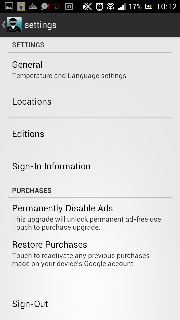
This page will show up and then you will have to choose 'Location'.


This will be your locations page which also shows your previous choices

You will then have to type in your location..

...and go back to the main page to see your outfit choices :)

When looking at an outfit, take note of the time of day, current temperature, 'feels like' temperature (which is really useful!) and also the Swackett character version at the bottom

Here comes the fun part! Try scrolling up, down, left and right for more options. You could even come across some Swackett Easter Eggs ;)

Since I chose Melbourne and it is already night time, this is a warm ensemble for the ladies who are out and about tonight

There are even random facts which are mainly for fun but are sometimes interesting

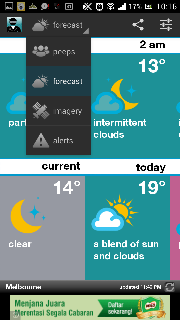
Remember that the app needs exploring if you want to make full use of it, so try out the different icons on the top bar, starting with the weather icon - which is the second top icon from the right - to show the current weather plus today, tonight and tomorrow's weather

So here is what I got when I picked tomorrow's daytime weather. The outfit is shown on a new Swackett peep

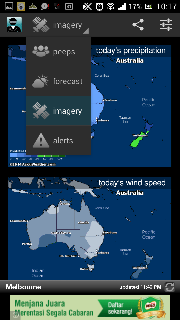
And as you continue exploring the app you will find more and more useful information :) Select 'peeps' for a drop down menu with options like forecast, imagery  and alerts

Under imagery you can see the map of the country you chose, just like weather reports on the news

And under alerts (I think) you will be notified of any natural disasters that are on watch in your area (there hasn't been any alerts so far on my side, so not much can be said about this option)

For more info on the app, you can visit their website and blog  which has the latest updates on the app versions and features :)

Enjoy the app everyone and say tuned for my next post on my visit to Fukuoka, Japan :D

PS: A big sorry if the photos posted today are not very clear :( Need to find a way to enhance the quality of my screenshots.